
Cancelled dPAs Now Visible on the Prior Authorization Table
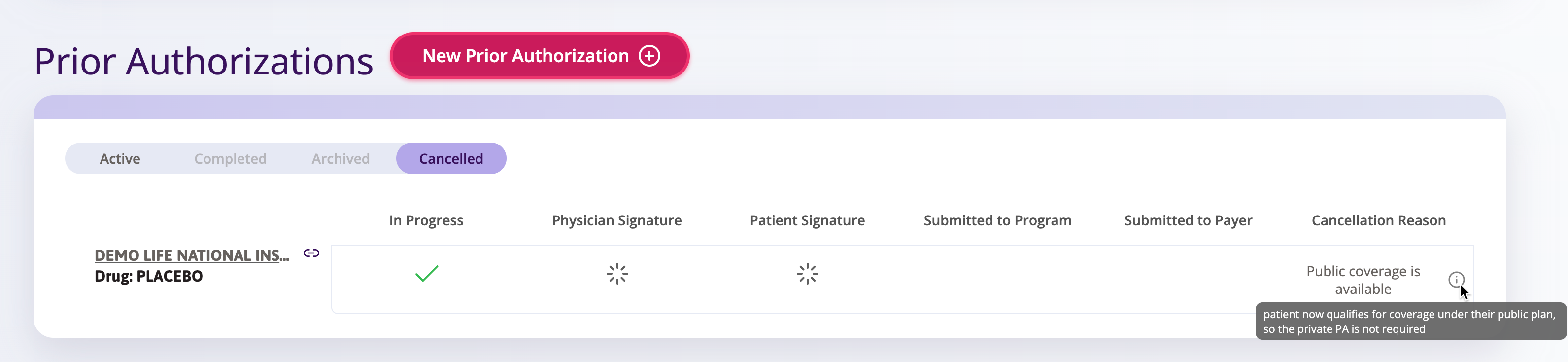
PSP Staff can now view Cancelled dPAs directly from the Prior Authorization table in the Patient Profile, providing full visibility into a patient's dPA history without navigating away from their profile.
Previously, Cancelled dPAs were only accessible through the Activity Table — and even then, important details such as "Additional Notes" were not visible. A new Cancelled tab has been added to the Prior Authorizations table in the Patient Profile, allowing staff to review all cancelled dPA records, see cancellation reasons, and maintain a more complete audit trail — all from one place.
New Status for dPAs That Have Been Downloaded
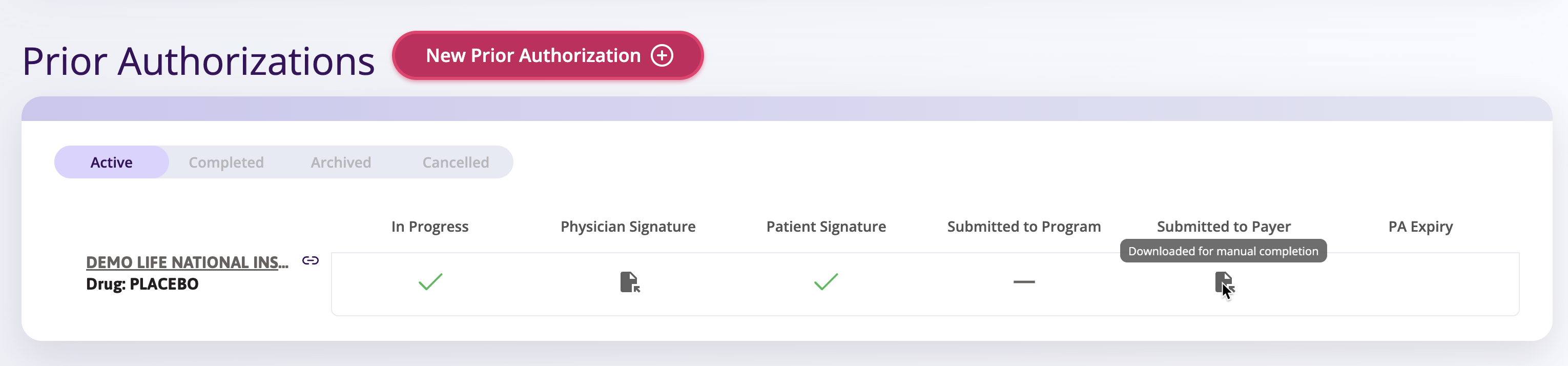
Auxita now reflects a distinct status when a patient downloads their dPA for manual completion in specific workflows, giving all users clearer visibility into where each form stands.
Previously, if a patient downloaded their dPA for manual completion, the form moved directly to "Awaiting Signatures" — a status that did not accurately reflect the patient's download action and made it difficult for PSP staff and other Auxita users to determine what follow-up was needed. A new dedicated status now appears in Auxita when the download occurs, helping teams triage their queues and take timely next steps toward completing the submission.
🌟 Improvements
Prevent Lost Comments with New Smart Warnings
To prevent you from accidentally losing drafted notes, we've introduced smart warnings across your forms. Now, if you try to close, save, or progress a form with unsaved text in the comment box, a quick prompt will warn you before you leave.
This helpful pop-up includes a pre-selected Save my drafted comment checkbox so you can instantly save your text and complete your action in a single click. If you cancel the warning, your drafted comment will remain fully intact so you can keep editing.
🛠 Fixes
Required Field Indicator and Validation Message Corrected for Insurance Requests
We've addressed two issues in the Insurance Request flow: the Plan Number field was missing its required field indicator (asterisk), and an incorrect validation message was displayed during submission. Both have been corrected to ensure users receive accurate guidance when completing insurance information.
Program Patient ID Can Now Be Edited and Deleted
We've resolved an issue in the Patient's Profile where the Patient ID field could not be edited or deleted once entered if the Program Name was too long. Users can now update or remove all Program Patient IDs as needed.
