
HCP Signature Notifications for Additional Forms
PSP Staff who create Additional Forms will now receive an email notification when a healthcare provider completes their signature on the form Request, so they're automatically informed when this key step is done.
Previously, there was no automated alert when a physician signed an Additional Form associated with each request. Users had to check the form status manually to confirm the signature had been completed.
With this update, an email notification is sent to the user who created the Form as soon as the HCP signature is captured — so you can take next steps with confidence knowing the form has progressed.
Insurance Information Review and Management
Patients can now review and manage their insurance information directly from insurance information requests received via email or SMS.
This enhancement helps ensure insurance records remain accurate and up to date by allowing patients to confirm, update, add, or remove insurance plans without requiring assistance from facility staff.
When a patient receives an insurance information request, they are directed to the Insurance Details step, where all insurance plans currently stored in their profile are displayed. Patients can review, edit, remove, or add insurance plans (up to existing plan limits) to keep their coverage information current and accurate.
👽API Note: No changes are required for existing integrations. Insurance updates made by patients continue to be communicated through existing API notifications.
Expiry Dates on Additional Forms
*Optional Configuration
Users with access to Additional Forms can now track expiry dates directly on their form requests, ensuring approvals are monitored and teams are reminded before they lapse.
If configured, an Expiry column will appear on the patient profile showing when a request is set to expire. Clicking the date opens the Set Expiry and Reminder dialog, where authorized users can adjust the date or reminder period as needed.
As a form approaches or passes its expiry date:
- A yellow exclamation point appears next to the Expiry column heading on the patient profile for the Completed form
- A message is visible in a tooltip on the warning icon alerting users that the approval will expire soon
- Forms surface in the Reminders tile on the Home page for users with Show Reminders enabled
- Summary emails will also reflect expired Additional Forms
When a form is Archived or Withdrawn, the expiry date is automatically removed and the form no longer appears in reminders.
🌟 Improvements
Quarterly Filtering on the Summary Tab
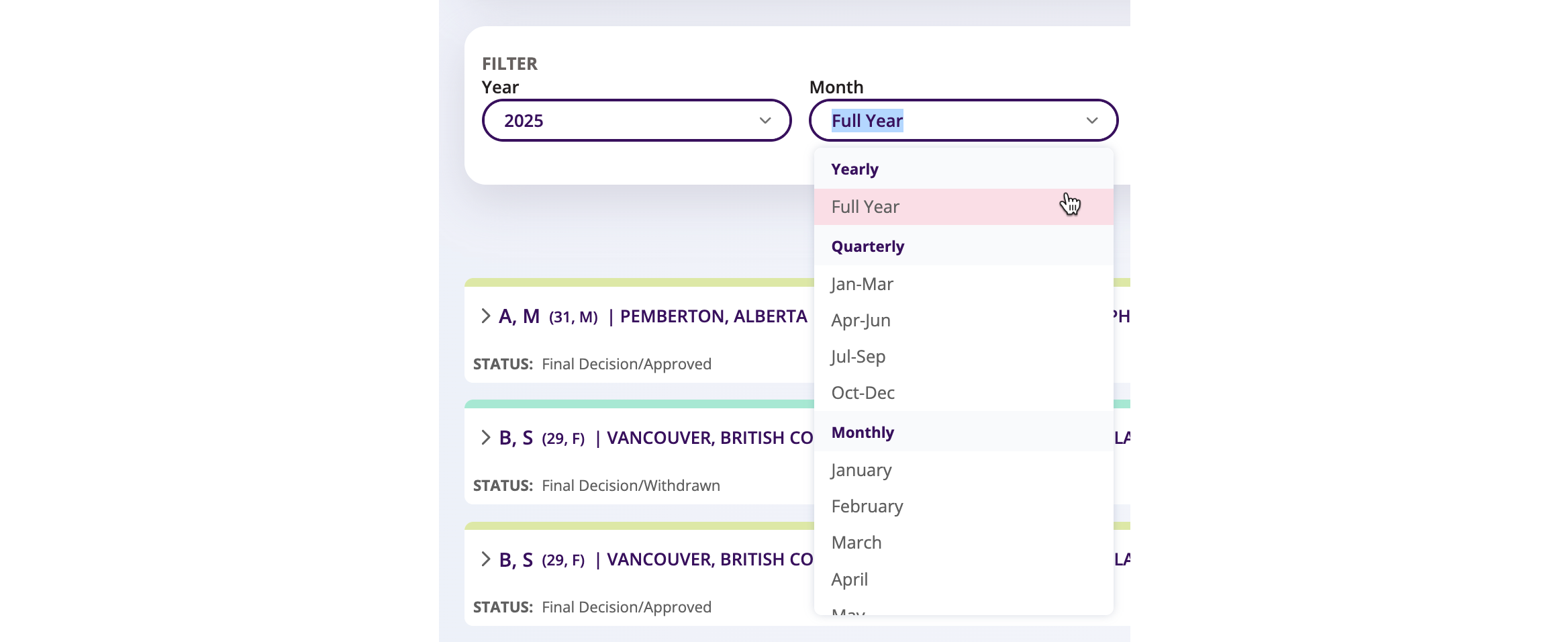
Manufacturer users can now filter the Summary Tab by quarter, making it easier to analyze performance across standard business reporting periods.
Previously, the month filter only offered two options — Full Year or a single month — requiring users to manually review data one month at a time when analyzing quarterly trends. This made quarterly reporting cumbersome and time-consuming.
The month filter dropdown now includes pre-defined quarter options (Jan–Mar, Apr–Jun, Jul–Sep, Oct–Dec), organized into three clearly labeled sections: Yearly, Quarterly, and Monthly, separated by visual dividers. Selecting a quarter automatically updates all Summary Tab statistics to reflect the full three-month period. The filter remains single-select — choosing any option automatically clears the previous selection.
Insurer Names Now Display in French for French-Language Users
French-speaking users will now see insurer names displayed in French throughout the Auxita platform.
Previously, insurer names appeared in English regardless of a user's language setting, which could create confusion when identifying and selecting the correct payer. With this update, the insurer name shown across the platform will automatically reflect the user's active language. English-language users will see no change to their experience.
👽API Note: No changes to API messages, Insurers will still be sent with their English name.
🛠 Fixes
Deactivated Users will no Longer receive Summary Notifications
We've resolved an issue where deactivated users were continuing to receive daily/weekly Summary Notifications from Auxita.
All deactivated user accounts have had their notification settings cleared — deactivated users will no longer receive these notifications.
"Only Search Within Facility" Checkbox Alignment Corrected
The "Only Search Within Facility" checkbox was displaying flush against the left edge of the search dropdown box. The alignment has been corrected for a cleaner, more consistent appearance.
Measurement Dates Now Displayed in French on Health Overview and Review Summary Card
An issue was identified where measurement dates were not displaying in French for French-language Physicians on the Health Overview tab, or for French-language Medical Reviewers on the Summary Card within the Review tab. Measurement dates now render correctly in French for all French-language users across both locations.
