
Form Assignment Notifications now include Form Title
When users are opted into Immediate Notifications and an Enrolment Form, dPA Form, or Additional Form is assigned directly to them, the notification will now include the form title.
This update improves clarity and helps users act on assigned forms more efficiently.
Home Page now shown on Login for Patient Support Program Staff
The landing page shown when logging into Auxita has been updated for PSP Users, Field Case Managers, and Navigators. These users will now be taken directly to the Home page upon login.
This update provides quicker access to outstanding items, especially when navigating from summary emails, helping users act on tasks more efficiently.
Controlled Completion of Additional Forms
We’ve added a new permission that allows selected users to complete custom forms while preventing others from completing them accidentally.
For users without this permission, the button that would normally mark a form as complete is now greyed out. You can still see the option, but it cannot be clicked. Similarly, the “Mark as Complete” option in the menu is visible but disabled. This change ensures that forms are not accidentally finalized before all steps are completed.
For users who need to finalize forms, the button and menu option remain fully functional, allowing them to complete the form when appropriate.
🌟 Improvements
Summary Emails now reflect outstanding items accurately
Summary emails previously included informational documents that had already been cleared from the user's Home page. This has been updated so the counts in Summary emails now accurately reflect the actual outstanding items on each user’s Home page.
In addition, when an informational document was not assigned to a specific user, clearing it from one user’s Home page would remove it for all users. This has been corrected - each user must now individually clear informational documents that are not assigned directly to them
Statistics: Zero-Value Tiles now hidden
Statistics shown on the Review and Summary Tabs have been updated so tiles with a value of 0 are no longer displayed. This ensures that only meaningful outcomes appear in the statistics.
Positive and negative values will continue to be shown, and calculated statistics will continue to display 0 when the calculation's output is zero.
Text Display on Summary Cards
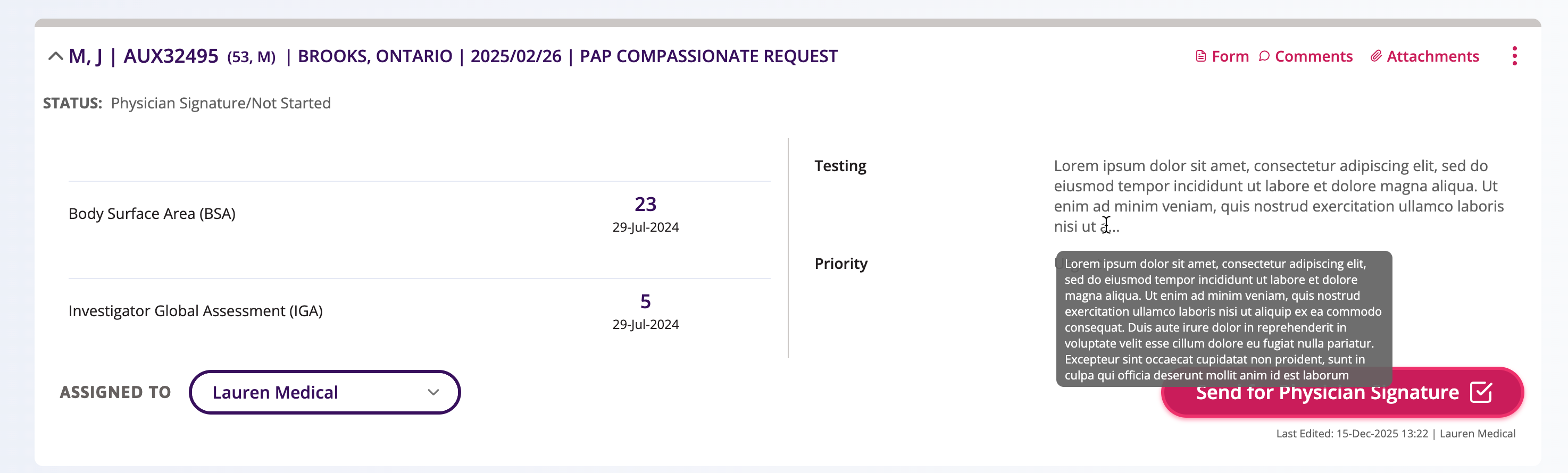
When there was a large amount of text entered into a field that displayed on a Summary Card, characters could occasionally overlap with other data. This has now been fixed and text will wrap or truncate when it reaches its limit. Users can view the full content by hovering over the field to see a tooltip with the complete text.
Public Insurance Plan List Reorganization & Naming Improvements
We’ve improved how public insurance plans are displayed across Auxita to make it easier to quickly find and select the correct coverage.
Previously, public insurance plans were listed using the governing authority name first, which made the list harder to scan. In addition, some plans were outdated or duplicated, increasing the risk of selecting an incorrect payer.
- Public insurance plans now follow a clearer naming convention: Province (2-letter code) – Governing Authority Name (abbreviation)
- The Plan Payer list is now organized into two categories:
- Provincial / Territorial Plans, listed alphabetically by province code (AB, BC, MB, etc.)
- Federal Plans, listed alphabetically by plan name
Plan Sponsor Field Now Optional for Private Insurance
Previously, the Plan Sponsor field was required when creating or editing a Private Insurance plan. However, this information is not always collected by providers, partners, or patients, and is rarely required for prior authorization. This requirement created unnecessary friction and blocked users from completing insurance setup.
As a result, we’ve updated the Private Insurance experience to better reflect real-world workflows by making the Plan Sponsor field optional.
🛠 Fixes
Assigned To Counts Now Reflect Only Assigned Enrolments
An issue was identified where Assigned To counts included enrolments that were not directly assigned to the user if the user was listed as the prescriber. This has now been corrected— Assigned To counts will only include enrolments that are explicitly assigned to the user, ensuring accurate task and workload visibility.
Patient Search Hint Display Corrected
An issue was identified where the patient search hint tooltip was partially cut off for users without access to full patient information.
👽 API
API Updates for Insurance
For patient-private-payer events, the Plan Sponsor field is now optional for both create and update actions.
The patient-public-payer event will reflect the updated public insurer list. For this event:
- Subject:
public-insurance - Label:
plan-payer - Value: Updated insurer name:
- Alberta Health Care Insurance Plan (AHCIP)
- Medical Services Plan (MSP)
- Manitoba Health Services Insurance Plan (MHSIP)
- New Brunswick Medicare
- Medical Care Plan (MCP)
- Medical Services Insurance (MSI)
- NWT Health Care Plan (NWTHCP)
- Nunavut Health Care Plan (NUHCP)
- Ontario Health Insurance Plan (OHIP)
- Health PEI (HPEI)
- Régie de l'assurance maladie du Québec (RAMQ)
- Saskatchewan Health Services Plan (SHS)
- Yukon Health Care Insurance Plan (YHCIP)
- Canadian Forces Drug Benefit Plan (CFHS)
- Correctional Service Canada (CSC)
- Interim Federal Health Program (IFHP)
- Non-Insured Health Benefits for First Nations and Inuit (NIHB)
- Royal Canadian Mounted Police Health Benefits Program (RCMP)
- Veterans Affairs Canada (VAC)
