
Fax Cover Sheet Now Automatically Included with dPA Submissions
Every dPA form submitted via fax to a payer will now automatically include a cover sheet as the first page of the submission.
The cover sheet is generated in the background — no action required from front-end users. It includes key details such as the insurer name and fax number, sender information, date of submission, page count, form name, and a confidentiality notice.
Cover sheets are supported in both English and French.
🌟 Improvements
Priority Filtering and Colour Indicators for Additional Forms
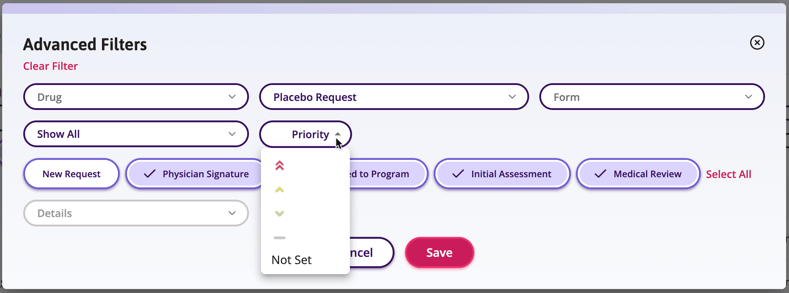
Users can now filter Additional Forms by Priority and see urgency at a glance directly on the Status Table — without opening individual forms.
These two enhancements work together to give Medical Advisors and PSP Office Staff faster visibility into high-priority requests:
A new Priority filter is now available under Advanced Filters on the Status Table and Review Tab. Users can select a priority level — Red, Yellow, Green, or Grey — to surface only the forms that match that urgency. Filter options are displayed as colour indicators and are dynamically shown based on the priority values present in your data. The filter is single-select, and clearing it restores the full list.
In addition, each row on the Status Table now displays a small colour-coded icon indicating the form's priority level, so users can triage work without opening each form individually:
- 🔴 Red → double chevron up
- 🟡 Yellow → single chevron up
- 🟢 Green → single chevron down
- ⬜ Grey → double line icon
- No icon is shown when priority has not been set, keeping the table uncluttered
Note: Priority filtering is not available on the Summary Tab.
Control Which Reporting Period a Decision Counts Toward
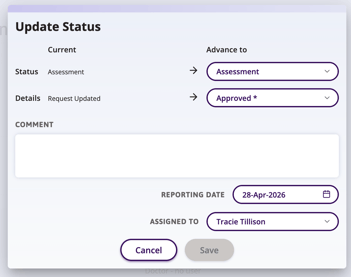
Authorized users can now specify which calendar period a decision is counted toward, ensuring program allocation statistics accurately reflect real-world business rules.
Previously, Auxita calculated statistics based on when an action occurred. This created misalignment for programs with fixed calendar-year allocation limits — particularly around year boundaries, where submissions, reviews, and approvals often span multiple periods.
With this update, a new Reporting Date field is available when completing an Additional Form. It defaults to the current date but can be adjusted by users with permission to complete Additional Forms. Users with permission to override the status of a complete form can also update the Reporting Date after the fact via a new option when using Update Status.
When the Reporting Date is changed, statistics are automatically recalculated — removing the decision from the previously counted period and adding it to the newly selected one.
🛠 Fixes
Link Expired Page Now Shown for Cancelled dPA OTU Links
When a guest Prescriber clicks a one-time-use link for a dPA form that has been cancelled, they will now see the "Link Expired" page after clicking Proceed.
Previously, clicking Proceed would silently fail with no feedback.
Field Accessibility & Visual Consistency
Placeholder text and form fields have been updated to improve accessibility and ensure a consistent visual experience across all workflows.
- Placeholder text now meets WCAG 2.1 AA contrast standards across all relevant fields, including Demographics, Language, Insurance Information, and DIN.
- Font colour is now consistent across checkbox and radio button selections, resolving an inconsistency where checkbox text appeared lighter than radio button text.
Encrypted PDF Rejection Handling
When an enrolment submitted to Auxita via email contains an encrypted PDF and is rejected, some Partners will now receive a coversheet-only PDF instead of no usable output.
The coversheet includes the original file name and a new rejection error code so Partners can identify which submission failed. When the PDF is not encrypted, the existing rejection process remains unchanged.
"Advance" Button Label Corrected in French for Additional Forms
We've corrected the French translation of the "Advance" action button on Additional Forms.
The button was previously displaying "Avancé" (a past participle/adjective) instead of the grammatically correct verb form "Avancer."
